 NotchPad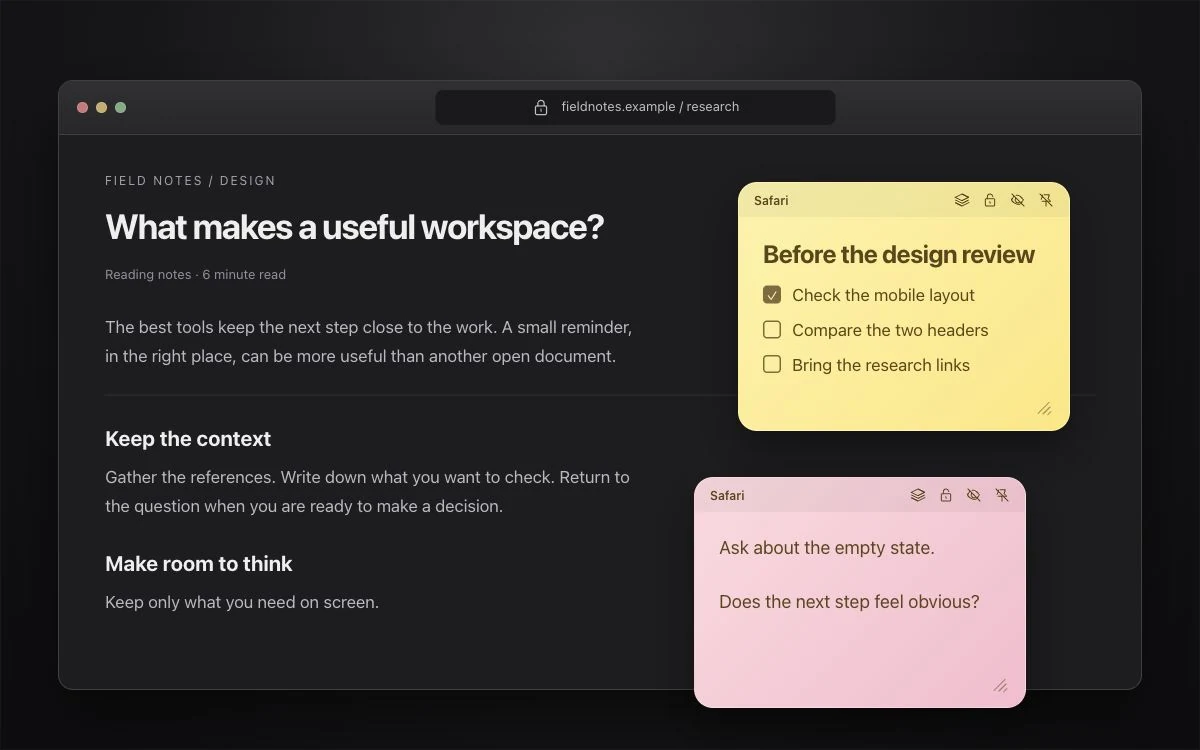
Choose where the note should appear
- Open or create a note in NotchPad.
- Open its three-dot menu and choose Show sticky in….
- Choose the window, the current supported page or Figma file, or the whole application. Follow the attachment prompt.
- If macOS asks, use NotchPad’s button to open Accessibility settings and enable NotchPad. Return to your work and attach the note.
| Attachment | When you see it | What survives closing |
|---|---|---|
| Window | On the particular window you chose | The note stays saved; its window attachment lasts while that window exists |
| Page or Figma file | When that supported page or file is active | The attachment returns when the same page or file is reopened |
| Application | Across the app’s windows | The attachment returns when the app is reopened |
Arrange them the way you work
Drag the header to move a note. Resize it from the corner. Each new sticky gets a color so you can tell notes apart. Use the stack control to keep several notes together, or leave them separate around the window.
Keep them out of the way until you need them
Turn on Start Hidden in Window Stickies settings, or hide an individual sticky with its eye button. Use the Toggle Window Stickies shortcut to show or hide them; press Control–Option–S.
Hide a note’s contents, not just its window
Use the sticky’s lock control to mask and encrypt its contents. Reveal it again with Touch ID or your Mac login password. Hiding a sticky is a visibility choice; locking it protects the note’s contents.
Browser pages are not arbitrary app sessions
Page attachment supports Safari, Chrome, Edge, and Figma when the app exposes a usable page or file identity. It follows the page or file, rather than a particular tab slot. Codex chats and Cursor repositories do not have individual attachment identities in this version: use a window or application attachment there. If a page cannot be identified, choose one of those broader options.
Accessibility permission lets NotchPad track the target app’s windows. It is needed for stickies, not for writing an ordinary note in the main panel.