← Back to NotchPad
MacBook notch app
A MacBook notch AI notes app with clipboard history.
Switch less between rich notes, Apple Intelligence edits, clipboard history, snippets, Apple Notes, imported files, and dictated notes from NotchLive.
If you searched for notch notes or a MacBook notch notes app, this is the focused NotchPad page.
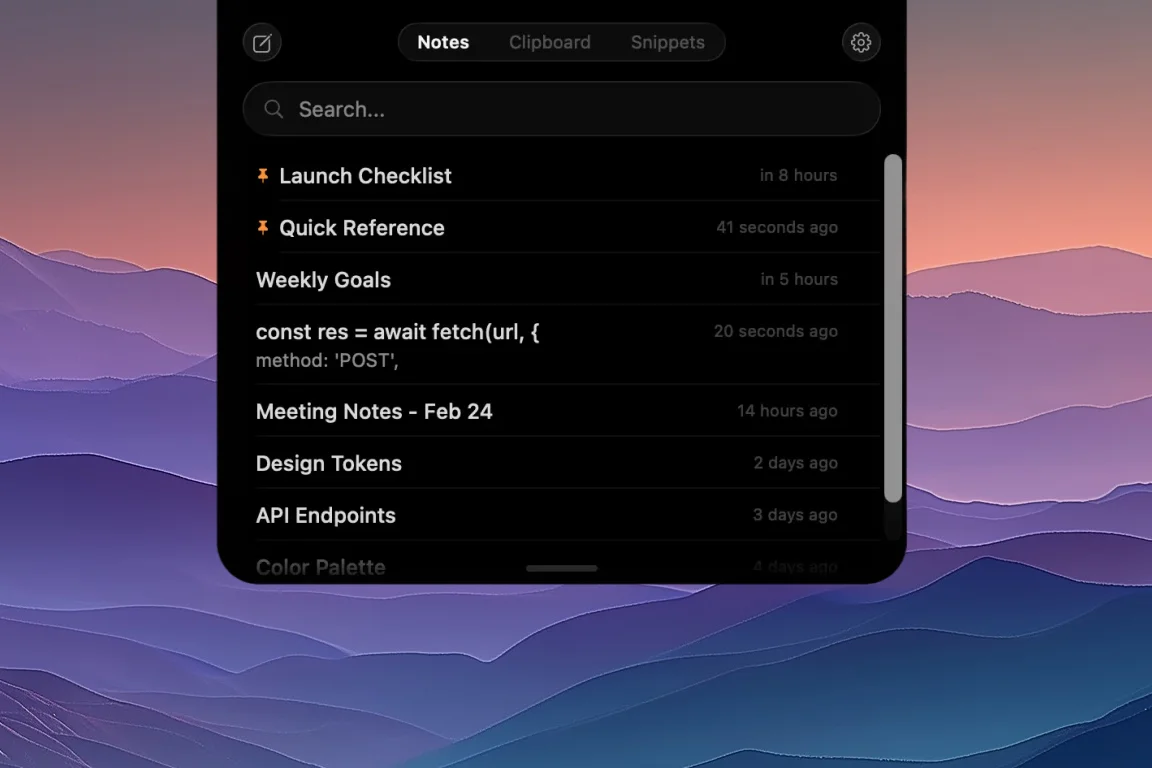
A notch app for text you reuse, not just widgets
Most MacBook notch apps focus on media controls, widgets, camera tools, or hiding the notch. NotchPad is for reusable work you want nearby: AI notes, clipboard history, snippets, imported files, Apple Notes, and dictated notes from NotchLive.
Its interface is built around reducing small text workflow switching. Notes, Clipboard, and Snippets are separate tabs in one compact panel; My Notes and Apple Notes stay separated inside the Notes area; and Floating Mode can place that panel beside your current work before snapping it back to the notch.
Rich notes
Capture thoughts, checklists, images, tables, project details, and reference text without opening a full notes app.
AI note edits
Rewrite, proofread, summarize, translate, generate titles, make tables, and organize notes with Apple Intelligence on supported Macs.
Clipboard history
Search copied text and copied Finder file references from the Mac apps you already use.
Reusable snippets
Keep code blocks, prompts, email replies, commands, and signatures close without digging through files or notes.
Apple Notes access
Browse, search, and edit Apple Notes from the notch when you need an existing note without switching context.
File import
Drop documents and code files onto NotchPad to turn them into notes with rich text preserved.
Floating Mode
Detach NotchPad, center it, place it anywhere on screen, and snap it back to the top-center hover zone when you are done.
Dynamic layouts
Use Compact, Standard, or Max width with Compact, Standard, or Full height so the same workspace can stay compact or expand when the task needs room.
Written text and spoken text
NotchPad keeps written text close: notes, clipboard history, snippets, Apple Notes, and saved references. If the useful text starts as a meeting, video, lecture, podcast, or quick spoken thought, NotchLive handles live captions, transcripts, translation, and voice notes on Mac.
That gives the notch a useful voice workflow: spoken thought, cleaned transcript, saved note. Your dictated idea lands beside your notes, snippets, and copied text instead of disappearing into a recorder app.
How NotchPad compares to other notch apps
| Need |
Typical notch app |
NotchPad |
| Media controls |
Shows now playing, volume, brightness, or album art |
Not the main focus |
| Widgets |
Calendar, system info, files, camera, timers |
Focused on notes and clipboard history instead of dashboards |
| AI notes |
Rare, or disconnected from the notch workflow |
Rewrite, proofread, summarize, translate, title, table, and organize notes with Apple Intelligence |
| Clipboard history |
Rare or secondary |
Search, pin, merge, and protect sensitive text |
| Voice notes |
Usually not included |
Handled through NotchLive handoff |
| Private presenter notes |
Usually not included |
Ghost Privacy hides NotchPad from screen shares and recordings |
| Floating placement |
Often fixed to the notch or menu bar |
Float anywhere, center for writing, then snap back |
| Privacy |
Varies by app |
Local-first, Ghost Privacy, AES-256-GCM, Touch ID for sensitive text |
Works on Macs with or without a notch
Hover works from the top-center screen zone on Macs with or without a physical notch. On notched MacBooks, that zone aligns with the notch. You can also open NotchPad with the Control-Control shortcut or from the menu bar. Same app, same notes, same clipboard and snippet workflow.
Requires macOS 15 Sequoia or later.
Who NotchPad is for
- Developers who keep commands, API notes, snippets, and credentials nearby.
- Writers who collect quotes, drafts, outlines, links, and spoken ideas.
- Founders and operators who capture follow-ups, customer notes, email templates, meeting thoughts, and screen-sharing talking points.
- Anyone who copies, types, imports, rewrites, or speaks text they later wish they had kept.
Start free, remove limits with Pro
Start with 20 NotchPad notes, uncapped Apple Notes access, 10 clipboard items, 5 snippets, and daily AI edits. Upgrade to Pro when you want unlimited NotchPad notes, searchable clipboard history, reusable snippets, and NotchPad AI. Pro is a $9.99 one-time purchase, covers up to 3 Macs, and has no subscription.
Keep reading
AI Notes App for Mac with Apple Intelligence
NotchPad 1.5.0: AI Notes, Rich Notes, and Better Clipboard History
Mac Clipboard Manager with Snippets
Best MacBook Notch Apps in 2026
Voice Notes with NotchLive, Saved Back to NotchPad
Access Apple Notes from Your MacBook's Notch
 NotchPad