Paste vs Maccy vs NotchPad: which Mac clipboard app fits?
Updated June 2026 · 8 min read
If you are choosing a Mac clipboard manager, the honest answer depends on what you want remembered. Maccy is the best free, focused clipboard history app. Paste is the polished visual clipboard with iCloud sync. NotchPad is for people who want clipboard history, reusable snippets, AI notes, Apple Notes access, and sensitive-text protection in one local-first Mac app.
The bigger question is whether you only need clipboard recall or whether you are trying to switch less between notes, copied links, snippets, Apple Notes, and reusable text.
Here is the quick decision:
Choose NotchPad if you want clipboard history plus snippets, AI notes, Apple Notes, and reusable text in one MacBook notch app, with local storage and Touch ID protection for sensitive text.
Choose Maccy if you want a free, lightweight clipboard manager and nothing more.
Choose Paste if you want a visual clipboard timeline, image/file history, and iCloud sync.
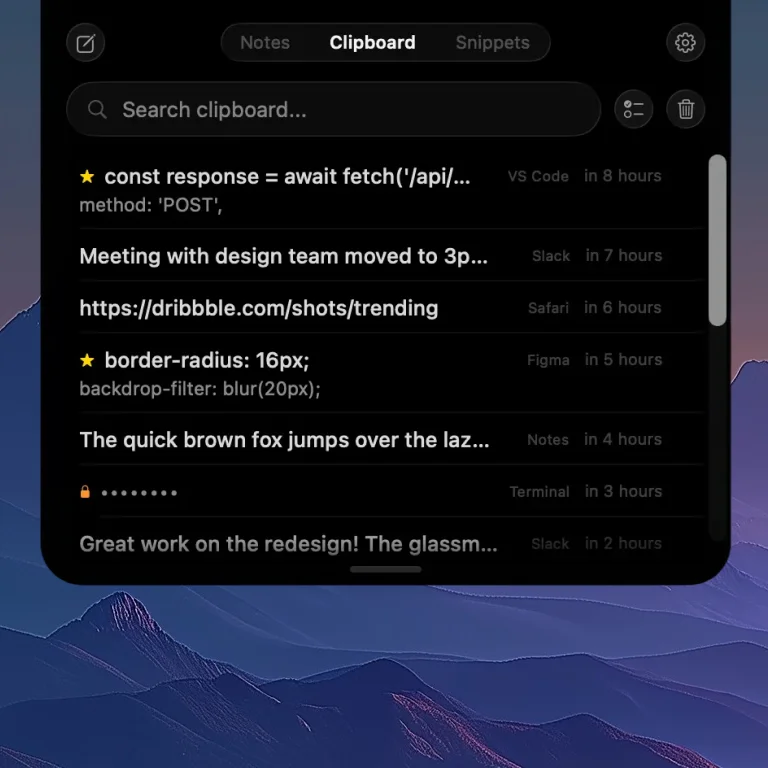
NotchPad's clipboard history — items from every app, with passwords automatically encrypted.
Quick comparison
Winner consensus
NotchPadBest if you want AI notes, snippets, clipboard history, Apple Notes, and sensitive-text protection in one Mac app.
MaccyBest if you only want a free, minimal clipboard history app.
PasteBest if you want a visual clipboard timeline with iCloud sync.
NotchPad
Paste
Maccy
Price
Free / $9.99 Pro
$29.99/year
Free (open-source)
Clipboard history
Yes
Yes
Yes
Notepad
Yes (rich text)
No
No
Apple Notes sync
Two-way sync
No
No
Snippets
Yes
Pinboards
No
Encryption
AES-256-GCM
No
No
Touch ID
Yes
No
No
Cloud sync
No (local only)
iCloud
No
Images/files
Rich previews + file import
Yes
Text only
Access method
Notch hover / ⌃⌃
Menu bar / shortcut
Menu bar / shortcut
Password protection
Auto-detect + encrypt
App exclusion rules
Respects clear signal
Paste: the visual clipboard with sync
Paste has been around since 2016 and is one of the most polished clipboard managers on macOS. Its standout feature is a visual timeline that shows your clipboard history as cards — including images, links, and rich text. You can organize items into Pinboards, search with OCR (text inside screenshots), and sync across Mac, iPhone, and iPad via iCloud.
Best for: People who copy lots of images and files, need cross-device sync, and want a visual interface for browsing history.
Trade-offs:
$29.99/year subscription. Over three years, that's about $90 — roughly 9x the one-time cost of NotchPad or more than the free cost of Maccy.
No encryption. Clipboard data is stored unencrypted and synced to iCloud. If you copy a password, it's stored in plaintext in Paste's history and potentially on Apple's servers.
App exclusion as security model. You can exclude specific apps (like 1Password), but you have to configure each one manually, and it's all-or-nothing per app.
Maccy: the free, minimal option
Maccy is free, open-source, and does exactly one thing: clipboard history. It lives in your menu bar, you press a shortcut to open it, type to search, and press Enter to paste. It's fast, lightweight, and has essentially zero learning curve.
Best for: Users who want a simple, free clipboard manager with no frills. Developers who prefer open-source software.
Trade-offs:
Clipboard only. No notes, no snippets, no rich text. If you need to store reusable text blocks or quick notes, you'll need a separate app.
No encryption. History is stored locally (good), but not encrypted (not as good). Anyone with access to your Mac can browse your clipboard history.
Respects clipboard clearing but doesn't encrypt. When a password manager clears the clipboard, Maccy clears it too. But during the window before clearing, the password is stored in plaintext.
NotchPad: clipboard history + snippets + AI notes
NotchPad takes a different approach from both. Instead of being a standalone clipboard manager, it combines clipboard history, rich notes, reusable snippets, Ghost Privacy, Floating Mode, and Apple Intelligence note edits into a single interface that opens from top-center hover or a keyboard shortcut. The free tier includes 20 NotchPad notes, 10 clipboard items, 5 snippets, and daily AI edits; Pro removes NotchPad limits.
That means NotchPad is not trying to replace Maccy for users who only want free clipboard history, or Paste for users who need image-heavy cloud clipboard sync. It is for people whose copied text often turns into something else: a note, a reusable reply, a code snippet, a prompt, a command, or a saved reference.
It also integrates with Apple Notes via two-way sync — browse, search, and edit your Apple Notes from the notch without opening the Notes app. With NotchPad AI, saved text can be rewritten, proofread, summarized, translated, titled, converted into tables, or organized on supported Macs. With NotchLive voice-note handoff, spoken thoughts can become saved notes too. Ghost Privacy can hide your notes from screen shares and recordings, and the security differentiator is also unique: passwords are automatically encrypted with AES-256-GCM and can only be revealed with Touch ID.
Best for: Users who want clipboard history and snippets and quick notes in one place, with automatic encryption for sensitive data. Developers, operators, founders, support teams, and writers who copy commands, replies, prompts, links, and reference text throughout the day.
Trade-offs:
Reuse-focused clipboard. NotchPad is built around text you want to search, pin, merge, clean up, and paste again. Clipboard history now includes richer previews for copied links, colors, files, images, videos, and Finder references, but Paste is still the stronger fit if your main workflow is a cloud-synced visual media timeline.
No cloud sync. Everything is local. If you need clipboard history on your iPhone, Paste's iCloud sync handles that. NotchPad's position is that your clipboard data shouldn't leave your device.
$9.99 for Pro. Start free with notes, clipboard history, snippets, and daily AI edits. Pro removes NotchPad limits - not free like Maccy, but no recurring fees. See pricing details.
The security question
This is where the three apps diverge the most. If you use a password manager — and you should — your clipboard regularly contains passwords, 2FA codes, and other credentials.
NotchPad auto-detects passwords from 1Password, Bitwarden, and Apple Passwords, encrypts them with AES-256-GCM on the fly, and requires Touch ID to reveal. The v1.0.2 release details how sensitive clipboard protection works.
Paste stores everything in plaintext and syncs to iCloud. You can exclude specific apps, but you have to remember to configure this.
Maccy stores everything locally in plaintext. It respects the clipboard-clearing convention, which helps but doesn't fully protect the data at rest.
If clipboard security matters to you — and if you copy passwords, it should — NotchPad is the only one of the three that encrypts by default.
The pricing question
Over three years:
NotchPad: $0 to start, $9.99 for Pro (one-time, removes NotchPad limits for notes, clipboard history, snippets, and AI edits)
Maccy: $0
Paste: $89.97 ($29.99 × 3 years)
NotchPad's perpetual license covers up to 3 Macs and includes all future updates. No subscription, no recurring charges.
Which one should you pick?
Choose NotchPad if you want clipboard history with automatic encryption, AI notes for captured text, reusable snippets, Apple Notes access, and voice-note handoff with NotchLive - all accessible from top-center hover or a keyboard shortcut. One purchase, no subscription, and your sensitive data stays encrypted on your Mac.
Choose Paste if you need cross-device clipboard sync, work heavily with images and files in your clipboard, and don't mind a subscription.
Choose Maccy if you want the simplest possible clipboard manager, prefer open-source, and don't need notes, snippets, or encryption.
 NotchPad