← Back to Blog
A private capture inbox for your Mac.
April 2026 · 6 min read
Your Mac captures text all day. A thought you type quickly. A link you copy. A Finder file you copied from the desktop. A command from Terminal. A quote from an article. A note from Apple Notes. A voice thought recorded through NotchLive.
The problem is not capture. The problem is where all of that text goes next.
That is the idea behind NotchPad: a MacBook notch app for notes, clipboard history, and snippets. It gives captured text one place to land before it becomes useful.
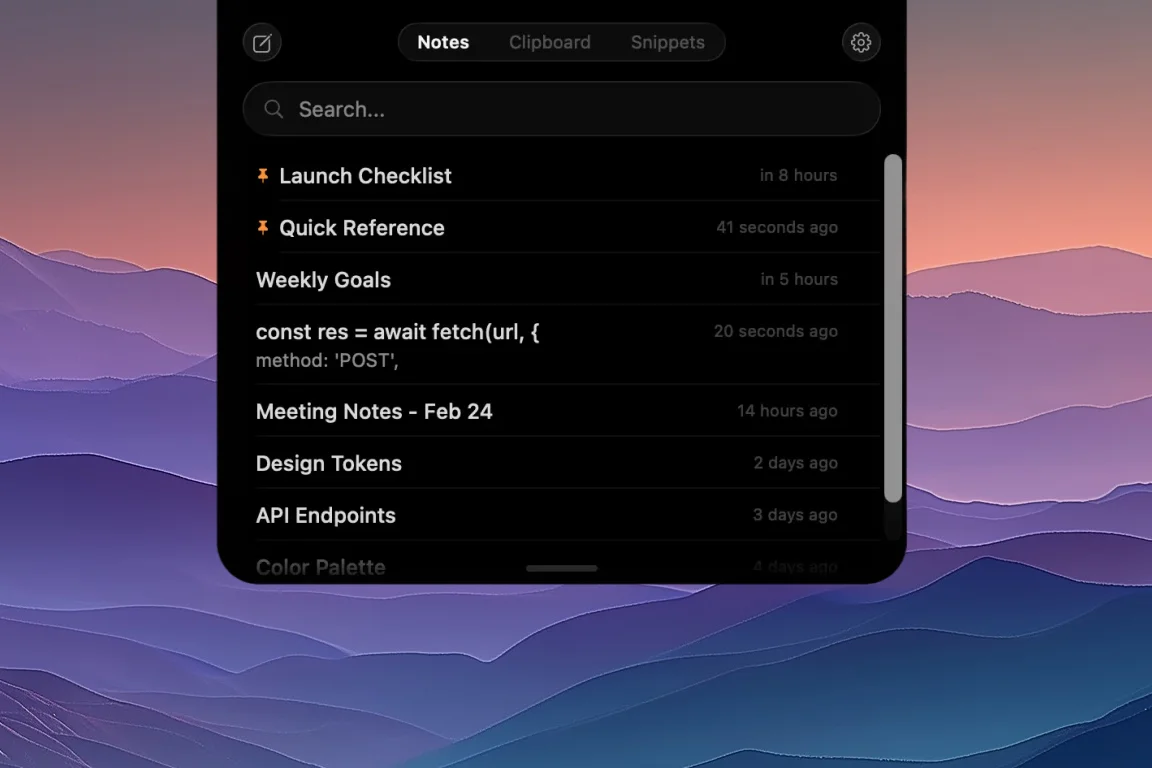
NotchPad is a small place for text that should not get lost.
Why notes plus clipboard history?
A notes app usually starts with a blank page. NotchPad starts with the messy reality of work: things arrive from everywhere.
- You type quick notes because opening a full app would break flow.
- You copy text you need for the next five minutes.
- You copy a file in Finder and need that reference again later.
- You save snippets because the same reply keeps coming up.
- You dictate with NotchLive because speaking is faster than typing.
- You reference Apple Notes because some notes already live there.
- You import files because a document or code file should become editable text.
- You keep talking points visible while sharing your screen.
Those are not separate products in your head. They are all versions of the same job: keep useful text nearby, searchable, and ready to reuse.
The capture loop
Write it
NotchPad starts free with 20 NotchPad notes. Hover over the notch, write the thing, pin it if it matters, and get back to what you were doing.
Speak it
NotchPad works with NotchLive for voice notes. Tap the microphone, dictate in NotchLive, use Raw or AI cleanup, then send the note back to NotchPad.
Copy it
Clipboard history turns copied text and Finder file references into memory. Instead of losing the URL, token, command, desktop file, or sentence you copied ten minutes ago, you can search it, copy it again, pin it, or merge it into a note.
Reuse it
Snippets turn captured text into something repeatable: email replies, prompts, code blocks, signatures, canned responses, and small templates you use all week.
Present with it
With Ghost Privacy, NotchPad can stay visible to you while hiding from screen sharing and recordings. Floating Mode lets you move that note surface where it helps, then snap it back to the top-center hover zone afterward.
Privacy is part of the product
Notes and clipboard history attract sensitive material. That is why NotchPad is local-first. Notes, clipboard history, snippets, and Ghost Privacy workflows stay centered on your Mac.
When NotchPad detects sensitive text from tools like 1Password, Bitwarden, or Apple Passwords, it encrypts that content with AES-256-GCM and reveals it with Touch ID. The goal is not security theater. It is making the fast path safer.
Simple rule: NotchPad is for text you want nearby, searchable, reusable, and available even while you are presenting.
Where Apple Notes fits
Apple Notes is still great for long-term synced notes, shared notes, and the things you want across iPhone, iPad, and Mac. NotchPad does not need to replace that.
Instead, NotchPad gives Apple Notes a faster access point. You can browse, search, and edit Apple Notes from the notch when you need an existing note without opening the full Notes app.
Where NotchLive fits
NotchLive handles audio: live captions, translation, session transcripts, and voice notes. NotchPad handles text: storage, search, editing, and reuse.
That split keeps both apps small. NotchLive does not need to become a permanent notebook. NotchPad does not need to become an AI transcription app. They simply hand work to each other at the right moment.
Who this is for
- Developers who need a nearby place for snippets, keys, commands, and project notes.
- Writers who collect quotes, outlines, research, and rough sentences.
- Founders and operators who capture follow-ups, customer notes, templates, and meeting thoughts.
- Anyone who copies, types, or speaks text they later wish they had kept.
Small on purpose
NotchPad is not trying to become your entire knowledge base. It is the small, fast layer before that: the place captured text lands while it is still fresh.
If the note grows into something bigger, move it wherever it belongs. If it stays useful as a quick note, snippet, or private reference, keep it in NotchPad.
Download NotchPad — Free
Start free. Pro removes NotchPad limits. Voice dictation requires NotchLive Pro.
 NotchPad