← Back to Blog
Best MacBook notch apps in 2026: notes, media controls, widgets, and captions
Updated June 2026 · 8 min read
The MacBook notch started as a camera cutout. In 2026, it is becoming a small software shelf: a place for media controls, widgets, files, AI notes, clipboard history, and even voice notes.
The best MacBook notch app depends on what you want the notch to do. Some apps turn it into a Dynamic Island-style media hub. Others hide it. A smaller group turns it into a real productivity surface.
If you mainly want media controls or widgets, NotchPad is not the media-control choice. It is the AI notes, clipboard history, and snippets choice.
Choose by job
If you came from a broad MacBook notch app search, start with the job you want the notch to do. The best choice changes quickly depending on whether you want media controls, widgets, file shelves, captions, or a text workspace.
| Job |
Best fit |
Why |
| Media controls and system feedback |
Boring Notch or MediaMate |
These are built around now playing, volume, brightness, and Dynamic Island-style feedback. |
| Widgets and a general notch dashboard |
NotchNook |
It is the broadest dashboard-style option for widgets, controls, files, and system information. |
| Files and a shelf-style workflow |
Peninsula |
It leans into file handling, clipboard, and quick drop-zone behavior around the notch. |
| Notes, clipboard history, snippets, and Apple Notes |
NotchPad |
It helps you switch less between captured text, reusable snippets, copied links, Apple Notes, and quick notes. |
| Captions, translation, transcripts, and voice notes |
NotchLive |
It is for spoken audio: meetings, videos, lectures, podcasts, captions, and voice capture. |
| Hiding the notch visually |
TopNotch |
It is a cosmetic utility for making the menu bar blend around the notch. |
Quick comparison
| App |
Best for |
Main features |
NotchPad take |
| NotchPad |
AI notes, clipboard history, and snippets |
AI notes, rich notes, Apple Notes, clipboard history, snippets, Floating Mode, Ghost Privacy, Touch ID, NotchLive voice notes |
Best if you want to switch less between notes, copied text, snippets, Apple Notes, and voice thoughts. |
| NotchLive |
Live captions, translation, spoken notes |
Private captions, translated subtitles, transcripts, voice notes, on-device Whisper AI |
Best if the useful text starts as audio. |
| NotchNook |
Widgets and system controls |
Dynamic Island-style tray, widgets, files, system info, media controls |
Best if you want one feature-rich notch dashboard. |
| Boring Notch |
Free media controls |
Now playing, music controls, calendar, battery, brightness and volume HUDs |
Best if you want an open-source media/control layer. |
| Peninsula |
Files, clipboard, quick notes |
File shelf, clipboard history, notes, notch interaction |
Closest overlap with NotchPad, but less focused on notes, clipboard history, and snippets. |
| Topnote |
Minimal notch notes |
Notes Island, quick capture, simple note access |
Good if you only need quick notes, not clipboard/snippets/security. |
| TopNotch |
Hiding the notch |
Black menu bar background that visually hides the notch |
Best if your goal is cosmetic, not productivity. |
| MediaMate |
Media and system feedback |
Media controls, volume, brightness, polished system overlays |
Best if you want beautiful feedback around the notch. |
1. NotchPad: best for AI notes and clipboard history in the notch
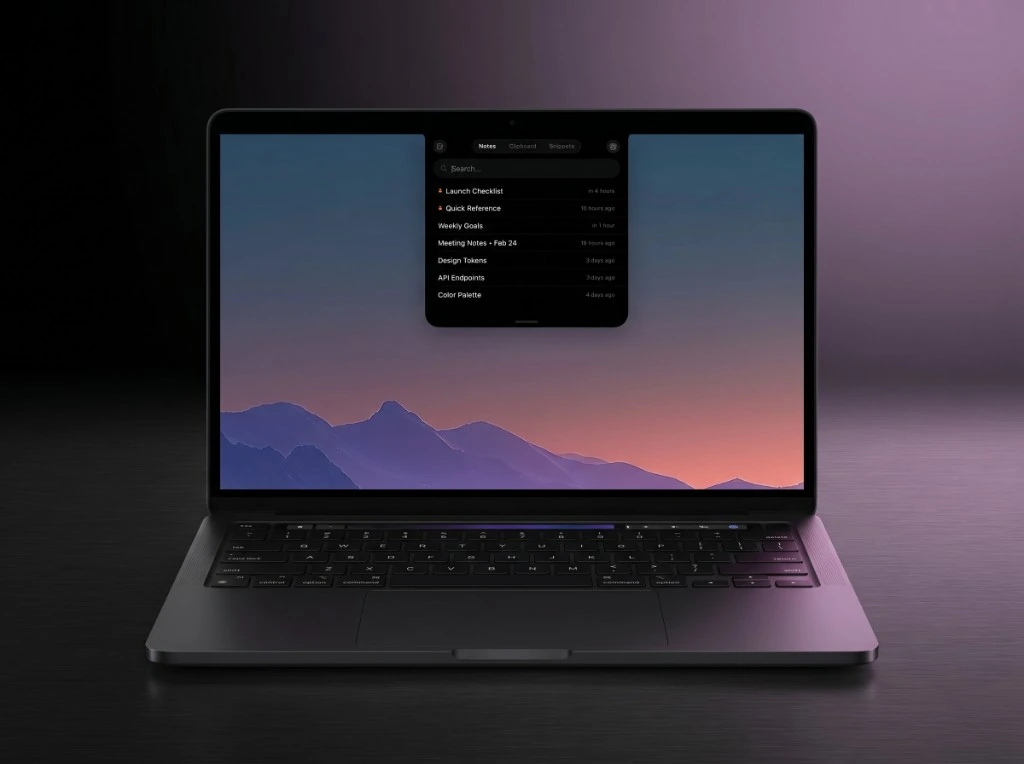
NotchPad is a MacBook notch app for AI notes, clipboard history, and snippets.
NotchPad is a MacBook notch app for AI notes, clipboard history, and snippets. Instead of using the notch for media controls or decoration, it opens rich notes, Apple Intelligence edits, clipboard history, reusable snippets, imported files, Apple Notes, and presenter notes from one place.
The practical benefit is less switching. Notes, Clipboard, and Snippets live in one compact interface, with My Notes and Apple Notes separated inside the Notes area. Floating Mode can move that text surface beside your current work, then snap it back to the notch afterward.
It also works with NotchLive. Tap the microphone in NotchPad, dictate in NotchLive, clean up the transcript, then send the finished voice note back to NotchPad.
NotchPad 1.5.0 adds AI notes with Apple Intelligence, richer notes with images and tables, better clipboard previews, and roomier layouts. Earlier Ghost Privacy and Floating Mode features still matter: you can hide NotchPad from screen shares and recordings, move the window anywhere on screen, then snap it back to the notch.
Best for: developers, writers, founders, operators, presenters, and anyone who wants a MacBook notch notes app with clipboard history and reusable snippets.
Standout features:
- AI notes with rewrite, proofreading, summary, translation, titles, tables, and organization on supported Macs
- Rich notes from the MacBook notch or the Control-Control shortcut
- Notes, Clipboard, and Snippets tabs for reducing small text workflow switching
- Apple Notes browsing, search, and two-way editing without opening the full Notes app
- Ghost Privacy for screen sharing and recordings
- Floating Mode with center and snap back to the notch
- Clipboard history with search, pin, merge, visible copy buttons, rich previews, and Finder file references
- Reusable snippets for code, email, prompts, and commands with visible copy buttons
- NotchLive voice-note handoff for speech-to-text capture
- Local-first storage, AES-256-GCM encryption, and Touch ID for sensitive text
If you are looking specifically for a MacBook notch app for notes, clipboard history, and snippets, NotchPad is the most focused option. If the AI note workflow is the main thing, start with the AI notes app for Mac page.
2. NotchLive: best for live captions, translation, and spoken notes
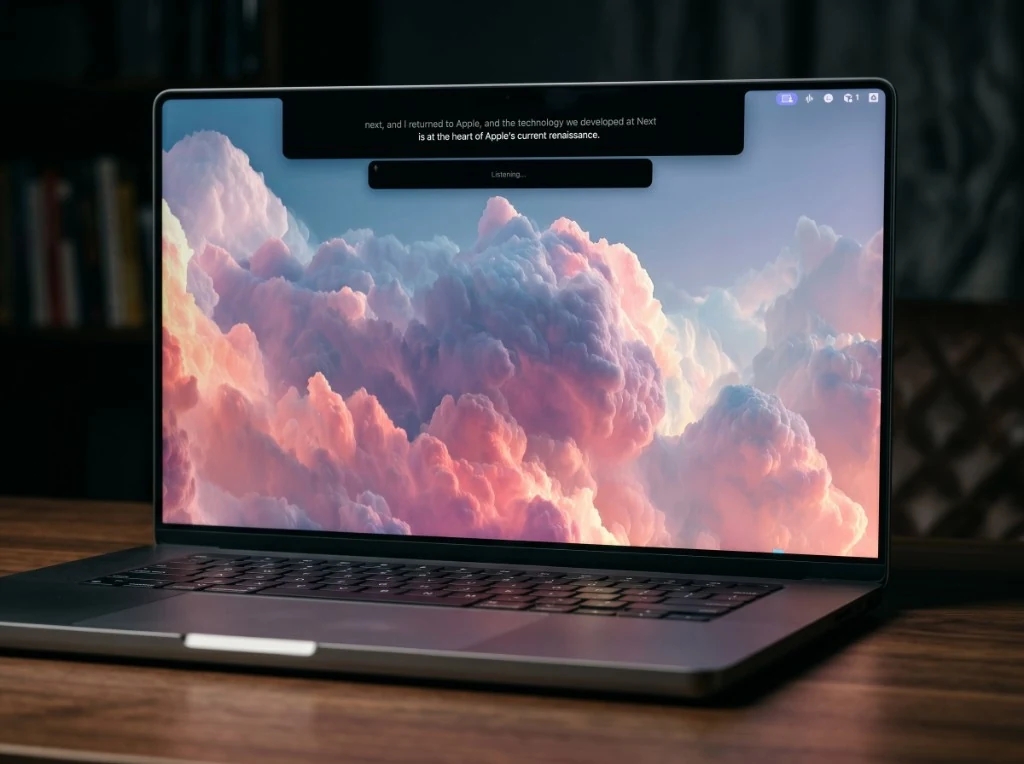
NotchLive uses the MacBook notch for private live captions, translation, transcripts, and voice notes.
NotchLive uses the MacBook notch for speech instead of copied text. It can show private live captions for meetings, videos, podcasts, lectures, and microphone audio, then turn spoken words into transcripts, translations, and voice notes.
Best for: people who want the notch to help with hearing, meetings, language translation, or spoken thoughts.
Trade-off: NotchLive is not a clipboard manager or notes hub. It fits best beside a notes and clipboard app like NotchPad when audio needs to become saved text.
3. NotchNook: best all-in-one notch dashboard
NotchNook is one of the broadest MacBook notch utilities. It turns the notch into a Dynamic Island-style hub for widgets, system controls, file access, media controls, and ambient information.
Best for: users who want the notch to become a general-purpose dashboard.
Trade-off: because NotchNook tries to cover many jobs, it is less specialized for writing, presenter notes, clipboard security, and voice-note workflows.
4. Boring Notch: best free notch media app
Boring Notch is an open-source notch utility focused on media controls and system feedback. It brings a Dynamic Island-like feel to the MacBook, with now-playing information, music controls, battery status, and custom volume or brightness HUDs.
Best for: people who want a free, open-source notch app for music and system controls.
Trade-off: it is not trying to be a notes app, clipboard manager, or snippets tool.
5. Peninsula: best for files plus light productivity
Peninsula positions the notch as a file and utility shelf. It has overlap with NotchPad because it includes quick notes and clipboard-style functionality, but its broader pitch is more about turning the notch into a multi-use workspace.
Best for: people who want file handling, drag-and-drop workflows, and a mixed utility layer.
Trade-off: if your main need is notes, clipboard history, snippets, and Apple Notes, NotchPad is more focused.
6. Topnote: best minimal notch notes app
Topnote is a cleaner, narrower idea: put notes in the notch. If all you want is a simple Notes Island for quick capture, it is easy to understand.
Best for: simple notch-based notes without extra workflow features.
Trade-off: NotchPad goes beyond notes with clipboard history, snippets, Apple Notes, file import, encryption, and NotchLive voice capture.
7. TopNotch: best if you want to hide the notch
TopNotch is not really a productivity app. It makes the menu bar black so the notch blends into the display. It is simple, useful, and mostly cosmetic.
Best for: people who dislike the notch visually and want it to disappear.
8. MediaMate: best polished media feedback
MediaMate focuses on beautiful media and system overlays: now playing, volume, brightness, and related feedback. It is a good fit if your notch workflow is about watching, listening, and controlling playback.
Best for: media controls and system feedback around the notch.
Which MacBook notch app should you choose?
Choose a media-control app like Boring Notch or MediaMate if the notch should help with music, brightness, volume, and visual feedback.
Choose NotchLive if you want private live captions, translation, transcripts, or voice notes from audio playing on your Mac.
Choose NotchNook or Peninsula if you want a broad notch dashboard with many utilities in one place.
Choose TopNotch if you want the notch to disappear.
Choose NotchPad if you want the notch to capture text: AI notes, copied text, snippets, Apple Notes, imported files, presenter notes with Ghost Privacy, and spoken thoughts from NotchLive.
Why audio capture belongs in the notch
Most notch apps stop at widgets, files, media controls, or cosmetics. NotchLive gives the notch a different job: turning speech into text while the audio is happening.
That matters because voice notes often die in a recorder app. With NotchLive and NotchPad, a spoken thought can become editable text, then live next to your notes, snippets, and clipboard history.
That is the lane NotchPad is built for: not more widgets, but AI notes, clipboard history, snippets, and voice handoff one hover away.
Related articles
AI Notes App for Mac with Apple Intelligence
NotchPad 1.5.0: AI Notes, Rich Notes, and Better Clipboard History
MacBook Notch Notes App with Clipboard History
Paste vs Maccy vs NotchPad: Which Mac Clipboard App Fits?
Voice Notes with NotchLive, Saved Back to NotchPad
Download NotchPad - Free
Start free. Pro is a $14.99 one-time purchase. No subscription. Works on any Mac. See pricing.
 NotchPad